On Tuesday, Eric and I hosted a session for OpenBed Co., as part of their CEO Growth Series.
The room was adult foster home owners. Small, licensed, residential care, usually a handful of beds in an actual house. The same business is called an adult family home in Washington, an adult care home in North Carolina, a residential care home somewhere else. Different name in every state, same work.
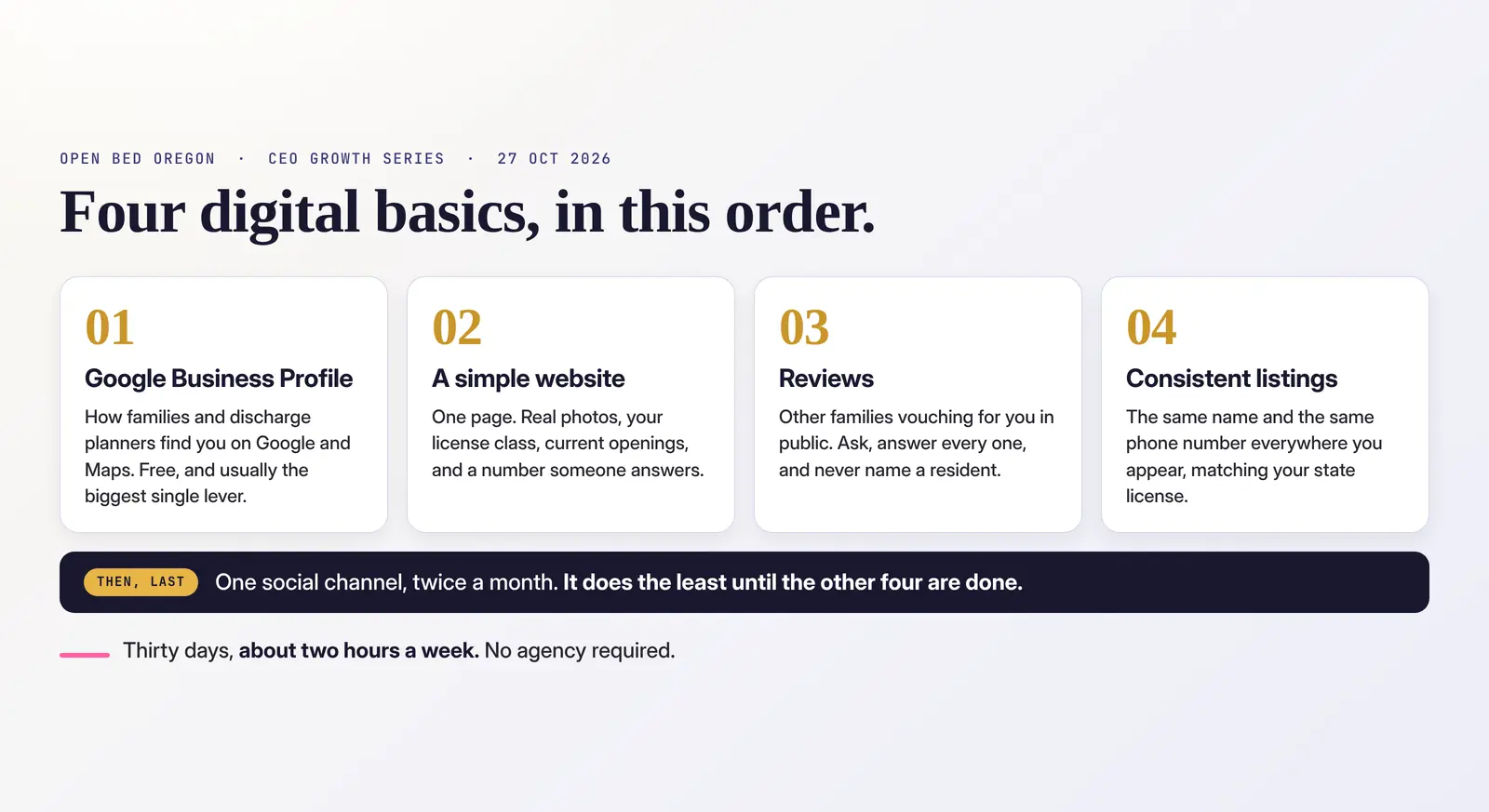
It is also the part of senior care that gets the least marketing help, because the budget for an agency is not there and most advice written for senior living assumes a marketing director and a six-figure spend. So we brought the opposite: the four things that matter, in order, and a plan you can finish in a month at about two hours a week. No agency required. We said that out loud on the first slide, and we meant it.
Here is the whole thing.
Start by knowing who is actually looking
Three different people search for a home like yours, and they want different things.
Adult children. Usually at night, on a phone, somewhere between guilty and rushed. They are not comparison shopping so much as auditing you. They want real photos, some warmth, and the owner's face.
Discharge planners and case managers. Placing someone against a deadline, often the same day. They want care level, whether you have an opening, and a callback that happens.
Referral partners. The placement advisors and agents who send families your way. They want proof you are established and reliable enough to put their own name next to.
All three check Google before they call. That is the whole reason the order below is the order it is.
Four basics, in this order
One: your Google Business Profile. It is free, it is fastest, and for a local business it often brings in more than the website does. For one client we looked at, the profile drove roughly three times the traffic their site did, and produced 51 calls in a period when paid ads produced 27 leads.
Two: a simple website. One page. This is where a family decides whether to trust you.
Three: reviews. Other families vouching for you, in public.
Four: consistent listings. The same name and the same phone number everywhere you appear.
Then, and only once those are solid, one social channel.
Social goes last on purpose. It is the one everybody wants to start with and the one that does the least until the other four are done.
The decision only small care homes have to make
Here is the question that does not come up in any general marketing advice, and it was the first thing the room wanted to talk about: your residents live in your house. Do you put the address on the internet?
You can go either way, and Google supports both.
Show it if you offer tours during set hours and have signage. Then add the towns you serve alongside it.
Hide it if you want the residents' home kept private. Google calls this a service area business. You list the towns you cover instead, up to about twenty, and they should be within roughly two hours' drive.
Either way, Google verifies you against your real address. No P.O. boxes, no virtual offices, and expect a short video verification. Two homes means two profiles. And set it up on a business Gmail account you intend to keep, not a personal one you share.
A home in Salem might list Salem, Keizer and Independence, show up in all three, and never publish the street address. That is the normal answer for most of the room.
Then fill in every single field
A complete profile gets more calls than an incomplete one. That is most of the game.
- Category. The most specific one Google offers for your type of care, not the broadest.
- Description. Care levels, specialties, languages spoken, towns served. Start it with the licensing term your state actually uses: "Licensed adult foster home in Salem."
- Hours. When you answer the phone and offer tours. Not "24/7" because somebody is awake. Hours mean when a human picks up.
- Photos. Outside, common rooms, a sample bedroom, a real meal. No resident faces. Add new ones monthly.
- Phone and website. A number someone actually answers, and a link to your page.
- Posts. One a month. An opening, a new menu, a caregiver spotlight.
A Google Business Profile that is actually complete is the cheapest marketing asset in this industry and the most commonly half-finished.
One page is enough of a website
Nobody in that room needed a ten-page site. Here is the whole brief:
- Your home's name, town, and the area you serve
- The care you provide and your license class, said plainly
- Openings, even if it only says "call to ask"
- Real photos of your actual home, not stock, and a short note from you as the owner
- A big tap-to-call button and a short tour form: name, phone, best time to call
- A link to your Google profile and reviews
Then apply the phone test. Hand your phone to someone who has never seen the site and see whether they can find your number in five seconds. If not, nothing else on the page matters.
Cost is a few hundred dollars a year on a builder like Squarespace or Wix. One adult foster home client of ours pays about $330 a year for the site and about $15 for the domain. Fancy is not required.
Two things came up here worth repeating.
Somebody asked whether to publish prices. Consider a "starting at" range. People searching on price are usually close to deciding, and it screens out the calls that were never going to fit. We have written about that at more length.
And somebody asked about blogging. Honest answer: generic articles barely work now, because AI answers those questions before anyone clicks. One of our own adult foster home clients watched website traffic fall 41% between January and June without doing anything wrong. What still works is your own stories and your own experience, which an AI cannot generate. That is the same pattern we have watched across the client base, where traffic fell and leads went up.
Reviews: ask, answer, protect
Ask. After a good moment, a care conference, or the thirty-day mark. Text the family your direct review link so it takes them one tap.
Answer. Every review, within a week, the hard ones included. Short, warm, in your own voice.
Protect. This is the one owners get wrong, and it is the one that can actually hurt you. Never confirm who lived with you. Never mention a diagnosis or a care detail in a public reply. Thank them and offer to continue by phone.
Never pay for reviews and never write them yourself. Google removes them, and families can tell anyway. Gift cards for reviews are against Google's rules.
Steady beats a burst: a few a month is better than twenty in one week. Rating matters too, not just count. We have seen a community at 3.9 stars lose its top-three spot on the map.
Same name, same phone, everywhere
This is the dullest item on the list and one of the most valuable, because matching details are how both Google and AI assistants decide you are real.
Pick one exact spelling of your home's name, matching your state license, and one phone number. Then use them everywhere:
- Maps and data feeds: Google Business Profile, Apple Business Connect, Bing Places, Data Axle, Foursquare
- Senior care: your state license lookup, A Place for Mom, Caring.com, SeniorAdvisor.com, Seniorly
- Local and community: chamber of commerce, Area Agency on Aging, the 211 directory, Nextdoor, the BBB
- Social and reviews: Facebook page, LinkedIn company page, Yelp
You do not need all of them at once. Start with Google, Apple, Bing, Facebook and your state lookup, then add the rest over a few months.
If you have ever changed your name or your phone number, go looking for the old profile. One community we worked with still had a live listing under a previous name with forty reviews sitting on it, invisible to them and confusing to everyone else.
And on the placement advisors who send families your way: they can genuinely bring move-ins, and most charge a fee per move-in. A strong presence of your own is what lets you rely on them less.
Before you post a single photo of a resident
We gave this its own slide and we slowed down for it.
Get written consent first. It needs to be signed by the resident or their legal representative, it needs to name exactly where the photo will appear (website, Facebook, print), and you need to log it so you know who said yes to what. Then check every frame for charts, med carts and name boards before it goes anywhere.
This is not theoretical. This month the HHS Office for Civil Rights settled with Cadia Healthcare, which operates five Delaware rehabilitation and nursing facilities, for $182,000. Staff had posted residents' photos, names and health details as part of a "Success Stories" campaign on social media and the company's websites, without valid written authorization. OCR found the protected health information of 150 people had been disclosed, and that the company had then failed to notify all 150. The settlement came with a corrective action plan.
Treat it as though HIPAA applies, because for most of this it does, and your state's consent laws may add more on top.
When in doubt, post the food, the garden, or the porch.
Social media, last and small
One channel, done well. For this audience that is a Facebook page, posting twice a month. Families and local community groups are already there.
What to post: Sunday dinner, the food and not the faces. A caregiver spotlight, with their okay. The garden, the porch, the holiday decorations. An opening, the week you have one.
Twice a month is enough. Steady beats busy, and a page that has been quiet for a year reads as closed.
The 30-day plan
We closed with this, because a list of good ideas is not a plan.
Week 1. Claim, verify and complete your Google profile. Done when every field is filled in.
Week 2. Publish your one-page website. Done when it passes the phone test.
Week 3. Ask five families for reviews and fix your listings. Done when your name and phone match everywhere.
Week 4. Get your consent forms signed, then post twice. Done when your first two posts are live.
About two hours a week. One focus per week, and a clear finish line on each so you know when you are done rather than vaguely working on marketing forever.
Members of OpenBed Co. can find the checklist and the recording in the community, and a few owners are posting their progress there, which is the best possible version of this.
If you run one of these homes
Do the first week. Just the first week.
Open your Google profile tonight and find one field that is blank. There will be one. Fill it in.
That is genuinely how this starts, and it is free.
Greatness Digital is a digital marketing agency in Oregon that works only with businesses that serve seniors: senior living communities, home care agencies, placement advisors, elder law firms, and senior move managers.
Run a care home and want a second pair of eyes on any of this? Ask us, no pitch attached.
Frequently asked questions
- Should an adult foster home show its address on Google?
- Either choice is allowed. Show it if you offer tours during set hours and have signage. Hide it and list the towns you serve, up to about twenty within roughly two hours' drive, if you want residents' home kept private. Google verifies you against your real address either way, and will not accept a P.O. box or virtual office.
- Does a small care home really need a website if it has a Google profile?
- Yes. The profile is how families and discharge planners find you; the website is where they decide whether to trust you. A single page is enough, and on a site builder it costs a few hundred dollars a year.
- What should go on a one-page adult foster home website?
- Your name, town and service area; the care you provide and your license class; current openings; real photos of your actual home and a short note from the owner; a tap-to-call button and a short tour form. Then test whether a stranger can find your phone number in five seconds.
- Can I post photos of my residents on Facebook?
- Only with written consent, signed by the resident or their legal representative, naming exactly where the photo will appear, and logged. In October the HHS Office for Civil Rights settled with a Delaware nursing home operator for $182,000 over resident photos posted without valid authorization. When in doubt, post the food, the garden or the porch instead.
- How many online listings does a small care home need?
- Start with five: Google, Apple Business Connect, Bing Places, Facebook and your state license lookup. Add senior care directories, your chamber, the Area Agency on Aging and 211 over the following months. What matters most is that your name and phone number are identical on every one.
- How long does it take to get found online?
- Faster than most owners expect for the Google profile, where one client's calls rose about 7% in the first month after a cleanup, and slower for a website. A reasonable plan is 30 days of setup at about two hours a week, then a 15-minute check each month.