In this article
- Step 1: Write the questions families actually ask about care
- Step 2: Ask from a clean seat
- Step 3: Ask more than one engine
- Step 4: Run each question more than once, and count
- Step 5: Check the facts a family will act on
- Step 6: Follow the sources, and fix them there
- Step 7: Repeat monthly, with the same questions
- The shortcut: a free first read
- When to hand it off
The question I get most from senior care owners right now is some version of this: "Does ChatGPT recommend us?" An executive director at an assisted living community asks it. So does a home care owner with three territories, a placement advisor, an elder law attorney.
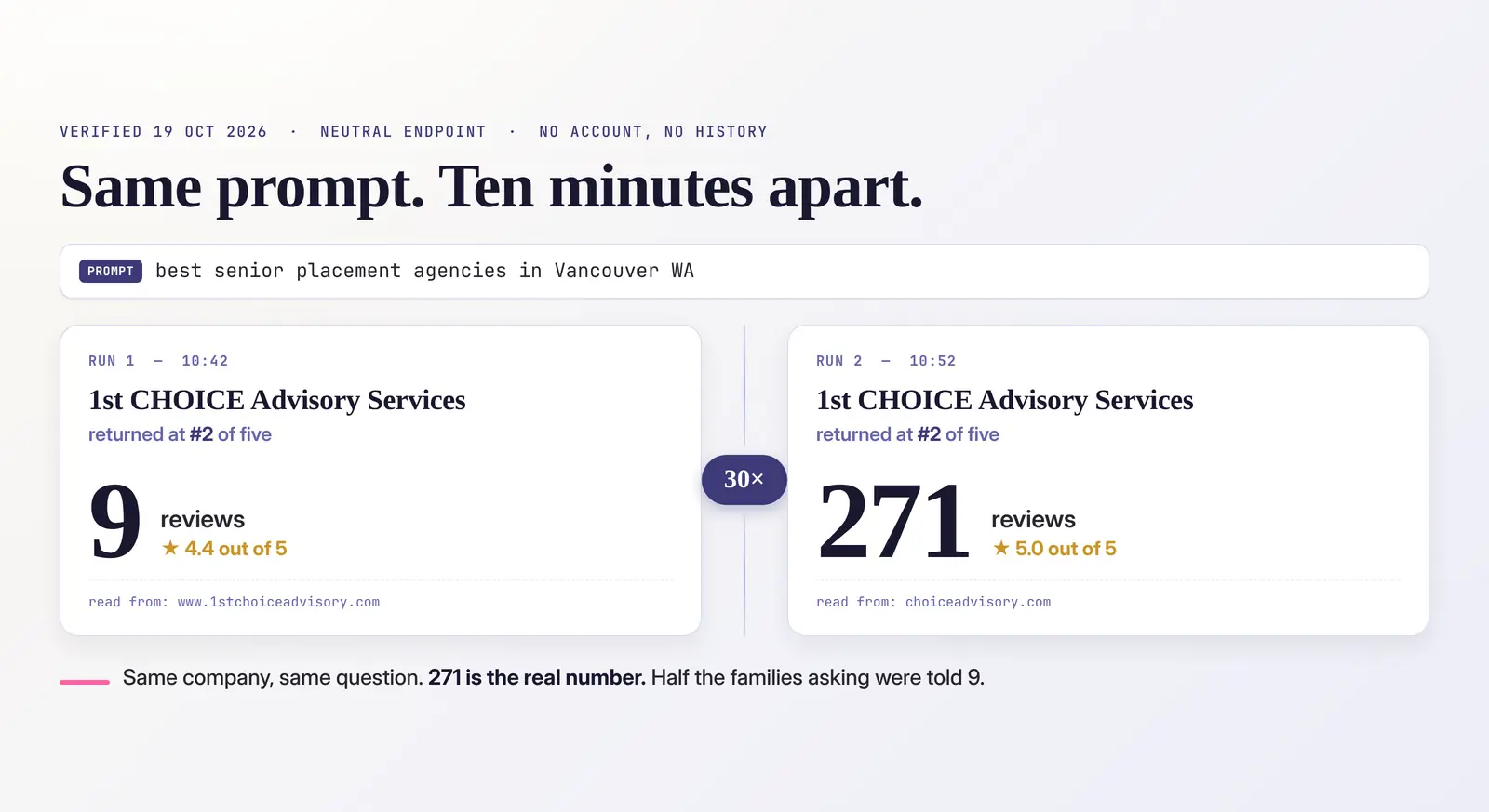
The honest answer is that you cannot find out by asking it once. I learned that the uncomfortable way, and wrote about it in the time we could not reproduce our own ChatGPT win for a senior placement client. Same company, same question, ten minutes apart, two different answers.
"You can't check it once" is not a method, though. So here is the method. It is the one we use for senior living, home care and placement clients, scaled down so an owner, a marketing coordinator or a community sales director can run it in about an hour a month with a spreadsheet.
Step 1: Write the questions families actually ask about care
Do not start with your community's name. A daughter looking for care for her mother never types it. Start with the questions she asks at the kitchen table, in her words, with your town in them.
We sort them into four kinds, because each one tests something different about how AI sees you:
- Best in the area. "What are the best memory care communities in Beaverton?" This is the ranking question.
- Looking right now. "Mom is being discharged from the hospital Friday and can't go home alone. Who provides in-home care in Salem this week?" Urgency changes which names come back, and in senior care the urgent version is the one that matters most.
- Who to trust. "Which assisted living communities in Vancouver have the best reputation with families?" This leans hardest on reviews, inspection records and third-party sites.
- Comparing options. "Compare the top senior placement advisors in Portland, with one strength and one caveat for each." This shows you how the model describes you, not just whether it names you.
Here is what one of each looks like across the senior care categories we work in, so you can adapt them:
- Assisted living or memory care: "Which memory care communities near Lake Oswego are best for someone with early dementia who is still fairly independent?"
- Home care: "Who are the most reliable non-medical home care agencies in Eugene for overnight care?"
- Home health or hospice: "Which hospice providers in Medford do families recommend, and do they accept Medicare?"
- Senior placement: "Is there a local senior placement advisor in Vancouver I can talk to instead of a national website?"
- Elder law: "Which elder law attorneys in Salem help with Medicaid planning for nursing home costs?"
- Skilled nursing: "Where can my dad go for short-term rehab after a hip replacement near Gresham?"
If you serve more than one city or care level, write questions for each. We have seen a client recommended in Vancouver and absent in Portland in the same week, and a campus named for assisted living but never for its memory care, because nothing it published described memory care on its own.
Long, specific questions like the ones above are where smaller providers get named, and they are invisible to keyword tools because they never reach the ad auction. They are also exactly how families talk to these tools.
Step 2: Ask from a clean seat
Your own ChatGPT knows who you are. It has your history, often your location, and sometimes it has worked out that you run the community you are asking about. All of that shapes the answer before you see it.
So run your checks where the model knows as little about you as possible:
- A private or incognito browser window, logged out.
- If you must use an account, turn off memory and use a temporary chat.
- One question per fresh chat. Do not ask about your community first and then ask for recommendations in the same conversation.
This will not make the answer neutral. Location still leaks through, and that matters in senior care, where families often search from a different city than the one their parent lives in. But it removes the biggest distortion, which is the model answering a person it already knows.
Step 3: Ask more than one engine
The adult children doing this research do not all use ChatGPT. Many see Google's AI Overview at the top of an ordinary search without choosing to. Some use Google's AI Mode, Perplexity, Gemini or Claude. A discharge planner or social worker may use something else again. Each one draws on different sources and weights them differently, so being named in one tells you little about the others.
At a minimum, check two: ChatGPT, and a normal Google search for the same question to see whether an AI Overview appears and who it names. If you have the time, add Perplexity, because it shows its sources openly and makes Step 6 much easier.
Step 4: Run each question more than once, and count
This is the step everyone skips, and it is the one that makes the rest worth doing.
Ask each question several times, each in a fresh chat. Five times is a reasonable minimum by hand. We run each prompt 20 to 25 times across several models for clients, because the answers really do move around that much.
Then count. The number you want is your mention rate: how many of the answers named you, out of how many you asked. Named in 3 of 5 runs is 60%. That is a measurement. "The owner saw us this morning" is not.
A simple spreadsheet is enough. One row per run, with these columns:
- Date
- Engine (ChatGPT, Google AI Overview, Perplexity, and so on)
- Question (copied exactly, every time)
- Care level or service the question was about
- Named? (yes or no)
- Position in the list, if it was a list
- What it said about you: rating, review count, care levels, payers, pricing, anything factual
- Sources it cited, if it showed any
- Competitors it named
The competitors column matters more than it looks. Your mention rate means little on its own. It means a lot next to the three communities or agencies families keep hearing about instead of you, especially the national referral sites, which often appear in place of any local provider at all.
Step 5: Check the facts a family will act on
Being named is half of it. Being described correctly is the other half, and in senior care the wrong fact costs you a call.
When you are named, check every fact against reality, starting with the ones families decide on:
- Care levels. Does it say you offer memory care, respite or hospice care when you do, and not when you don't?
- Payers. Medicaid, Medicare, VA benefits, long-term care insurance, private pay only. A wrong payer answer sends families away or brings you inquiries you cannot serve.
- Pricing or how pricing works.
- Reviews. Star rating and review count.
- Basics. Address, phone, service area, license type, and whether the website it links to is your current one.
In our experience, when an AI gets something wrong about a senior care provider, it is rarely inventing it. It is repeating a real source that is out of date. We watched ChatGPT tell families a placement client had 9 reviews when they had 271, because it read an old business record still attached to their previous domain. We have seen a community described as accepting a payer it stopped accepting years ago, traced to an old directory listing.
That is good news, because a stale source can be fixed.
Step 6: Follow the sources, and fix them there
Look at the sources column you have been filling in. Over a few weeks a pattern shows up: the same handful of sites keep feeding the answers in your category. In senior care it is usually some mix of these:
- Your Google Business Profile. Correct, complete, matched to your current website, with your care levels listed. If you run memory care and assisted living on one campus, consider whether each needs its own profile. Delete or merge duplicates.
- The senior care directories. A Place for Mom, Caring.com, SeniorAdvisor and similar sites appear constantly in AI answers about care. Claim your listing on each one that shows up for you and correct it, even if you do not pay for leads from them.
- Government and licensing records. For skilled nursing, home health and hospice, Medicare's Care Compare is a source families and AI both lean on. Assisted living and adult foster homes have state licensing and inspection records. You cannot edit these, but you should know what they say, and your own site should address it plainly.
- Professional directories. For elder law, attorney directories and your state bar listing. For placement, your association membership listing.
- Your own website. Say plainly, in text a machine can read, which care levels you provide, where, for whom, which payers you accept, and how pricing works. AI tools quote pages that answer those questions directly. A memory care program buried in a paragraph on the assisted living page will not be found. More on that in why third-party proof matters for AI answers in senior care.
- Old domains and stray subdomains. If an old website or a test site is still reachable, a model may read it and treat it as you.
If a competitor keeps being named and you are not, read the sources cited for them. That is usually the clearest picture you will get of what you are missing.
Step 7: Repeat monthly, with the same questions
Use the exact same questions every month. Change the wording and you are measuring a different thing.
Monthly is the right rhythm for most providers. The fixes in Step 6 take weeks to show up, because the models and the directories they read update on their own schedules. Checking daily mostly measures noise. Checking once a quarter means you will not know which change made the difference.
Watch for seasonality too. Searches for some kinds of care swing hard through the year: respite care searches run several times higher in late autumn than in spring. A drop in a quiet month is not necessarily a drop in visibility.
What you are looking for is direction: your mention rate across the same questions, month over month, alongside the competitors in that column. A move from named in 2 of 20 answers to 8 of 20 is real progress, even if no single screenshot looks dramatic.
The shortcut: a free first read
If you want a starting point before building the spreadsheet, our free AI visibility checker is built for senior care. Pick your care category and city, and it asks Google's AI Overviews, Google's AI Mode and ChatGPT the four kinds of question from Step 1. Then it shows how often you were named, which sites the answers leaned on, and whether your own site is easy for these tools to read.
Treat it the way you would treat any single check: as a first read, not a verdict. It is most useful for the sources list, because that tells you where Step 6 should start.
When to hand it off
The method above is enough to know where you stand. It gets harder with several communities, several care levels, several territories, and competitors who are working on this too. That is the point where the monthly runs, the source tracking and the fixes become a job. It is the work we do as AI search optimization for senior-serving businesses, including Memory Care Marketing clients, where the family asking is often in the hardest week of their lives and the answer they get matters.
Either way, the principle holds: one check is an anecdote. The same questions, asked many times, every month, is a number you can manage.
Frequently asked questions
- How do I check if ChatGPT recommends my senior living community or home care agency?
- Ask the questions families actually ask, with your care type and city in them, in a logged-out or temporary chat, several times each. Count how many answers name you. One check tells you very little, because the same question can return different answers minutes apart.
- What is an AI mention rate?
- The share of answers that name your community or agency, out of all the times you asked. Named in three of five runs is 60%. Tracked monthly on the same questions, it shows whether your AI visibility is moving, and how you compare with the competitors families keep hearing about.
- Why does AI get my care levels, payers or reviews wrong?
- Usually because it is repeating a real source that is out of date: an old Google Business Profile, a senior care directory listing, a previous domain. Find the sources the answers cite and correct them there. The answers follow once the sources change.
- Is there a free AI visibility checker for senior care?
- Yes. Our free AI visibility checker lets you pick your care category and city, asks Google's AI Overviews, Google's AI Mode and ChatGPT the kinds of questions families ask, and shows how often you were named and which sites the answers relied on. Treat it as a first read, then track the same questions monthly.